Visuals
Once Human ESP and Wallhack: Player, Creature, and Radar Layouts
Oct 10, 2026 · Updated Nov 21, 2026 · 4 min read
How Once Human ESP and radar work on PC: player boxes, creature tracking, item ESP, object ESP, and 2D radar range without burying the screen.
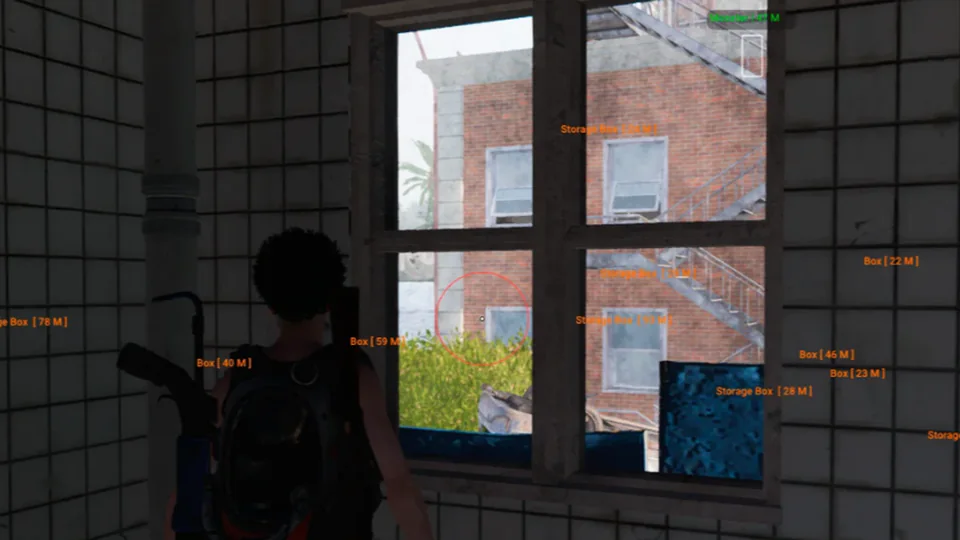
Once Human ESP is the module group most buyers actually live with. Aimbot gets the screenshots. Overlays decide whether a settlement fight is readable or a mess of boxes.
This page covers player ESP, creature ESP, item ESP, object ESP, and the 2D radar as listed on Complete. Confirm the live chips on checkout.
Player ESP first
Player and NPC ESP share the usual set: enemy and team flags, nickname, account ID, distance, health, shield, held item, kit, 2D boxes, corner boxes, skeleton, head indicators, direction indicators, snaplines, and a max distance cap.
In dense settlements, names plus snaplines plus skeleton is too much. Corner boxes with distance and health are enough for most PvP. Skeleton helps in interiors. Snaplines help orientation when you lose a target behind a building. Cap max distance so tags from the other side of the map do not eat FPS.
Creature ESP is not a second player layer
Creature tracking, NPC creature markers, creature loot visualization, and creature radar are their own group. They exist so a large threat is not a surprise, not so you paint every animal on the server.
Leave creature radar on when you are farming. Turn opacity down when you are in a tight PvP compound. If a shop only lists “wallhack” with no creature group, you are not looking at this catalog.
Item and object ESP
Item ESP covers weapons, ammo, consumables, armor, backpacks, valuables, keys, resources, and explosives. Object ESP covers containers, lock and alarm boxes, weapon loot, medical loot, food, resources, valuables, ammo crates, explosive barrels, auto turrets, and corpse loot.
That is the merchant-style list. We do not add POIs that are not in the listing. If checkout renamed a container type after a content drop, trust checkout.
Filter hard. Full item ESP in a loot-heavy settlement is how overlays become unreadable. Keep keys and valuables on. Drop food and junk ammo if the screen fills up.
2D radar
The radar lists smooth rotation, labels, player, NPC, creature, item, and object indicators, plus adjustable range and size. Put it where your vanilla minimap already lives. A huge radar in the center of the screen is a report magnet.
Range should match how you play. Short for settlements. Longer for open terrain. Recheck after patches; a client update can change how rotation feels.
Colors, panic key, and capture
Configurable colors belong in misc, but they save ESP. Dim boxes at night. Keep enemy contrast without neon. Panic key exists for a reason. Test OBS Game Capture locally. Forum threads linked from Complete cover capture leaks better than a shop FAQ.
For a first layout, read the config presets post, then save a settlement profile and an open-world profile before you raise every distance slider.
Questions about this guide
- Is Once Human ESP the same as a wallhack?
- Players search both terms. On this site, ESP means listed overlays: boxes, skeleton, names, distance, loot, and radar. We do not advertise extra wallhack modes beyond those groups.
- Does ESP show creatures and loot?
- Complete lists creature tracking, item ESP, object ESP, and a 2D radar. Confirm each group on checkout.
- Will ESP show on stream?
- Stream-capture modes are discussed in forum threads. Record a local clip before you go live. Settings can leak after a patch.
Keep reading
Buyer's Guide
Best Once Human Hacks in 2026: What to Check Before You Buy
A practical checklist for Once Human Hacks on PC: module lists, live status, loader delivery, and what separates usable aimbot and ESP from empty marketing.
Oct 22, 2026 4 min read
Read buyer guide
Settings
Once Human Aimbot Settings: FOV, Smoothing, and Bone Priority
How to tune Once Human aimbot settings on PC: FOV, smoothing, bone selection, visibility checks, and distance caps without stuffing a clip with snaps.
Oct 18, 2026 4 min read
Read settings guide
Plans
Once Human Hacks Plans: Complete Suite vs Utilities
Compare Once Human cheat software on PC: the Complete suite versus Cloud DMA, HWID Spoofer, and Skin Changer. Confirm modules on checkout.
Oct 14, 2026 4 min read
Read plan comparison